A timer for Mac
Always in view.Never in the way.
Kivern floats above other windows on your Mac. Watch a lesson, give a presentation, or join a call without switching apps to check your timer.
See how it worksComing soon to the Mac App StoreNative for macOS 14 or later
02 · Sizes and transparency
More freedom.
Less space.
Start with the full window. Shrink it to a pill, or keep only the numbers. Then let your work show through it.
03 · Three modes
Three ways
to keep time.
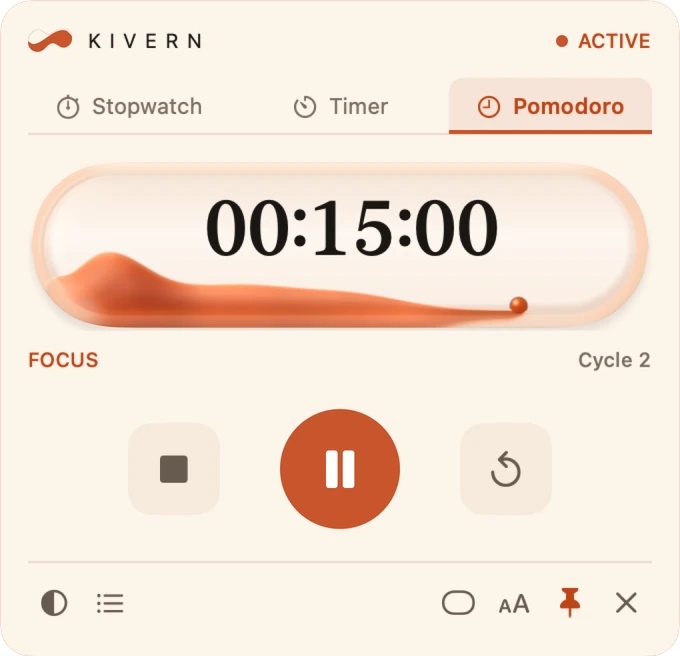
Each mode has its own face, so you can tell at a glance which mode you're in.
Stopwatch
How long does this take?
Counts up, with laps. For a rehearsal, a workout or a task.
Timer
How much time is left?
Counts down from the time you set. Preset durations from 5 to 60 minutes, and repeat if you like.
Pomodoro
When do I take a break?
Focus and breaks in cycles you set, 25 and 5 minutes by default. The break starts on its own; the next focus too, if you turn it on.
Focus in your accent colorBreaks always in green
04 · Fluid
Time, made fluid.
The time you have left, as liquid in a glass capsule. It drains as you go.
It moves while it counts.
The surface drifts slowly as time runs. Drag the window and the liquid sways; point at it and the surface dips.
It ends in drops.
When time is up, the liquid sways once and what is left breaks into drops.
It changes color.
In Pomodoro, focus ends and the capsule refills in green for the break, on its own.
Pause, and the liquid settles and stays still. In Timer and Pomodoro the volume is the time left; in Stopwatch the capsule stays full and only the surface moves.
Recorded from Kivern itself. Respects Reduce Motion on your Mac.
05 · Your way
Your time,
your way.
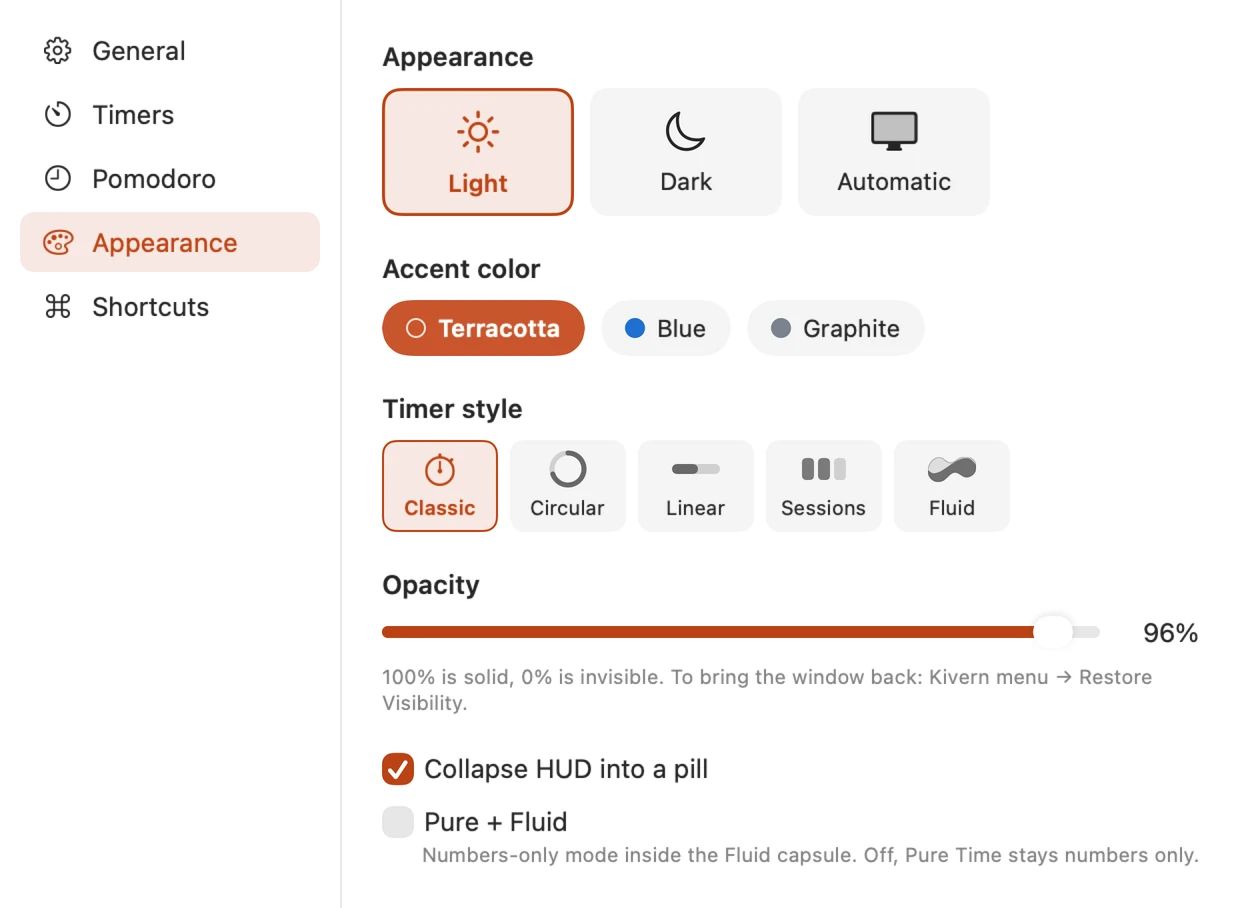
Five styles
Appearance can also be Automatic, following your Mac. Graphite also turns the background neutral gray.
06 · Try it
Explore Kivern setups.
Pick a scenario and adjust the preview. The Mac desktop is a demo; the Kivern footage was recorded from the real app.
Start here
Time and format
Look
Over other windows
Off: Kivern takes your clicks. The video behind it stays as it is.
Some options are dimmed because they don't have recordings yet.
The Kivern icon in the menu bar opens the app's own menu.
In this simulator, the Window recordings still show the Portuguese interface. English recordings are pending.
07 · Details
The details that
make the difference.

Quick Timer
Press ⇧⌘Space, type 25m or 1h 30m, and press Return. The countdown starts right away.
Shortcuts
- ⇧⌘SpaceQuick Timer
- ⇧⌘CShow or hide the panel
- ⇧⌘TClick-through on or off
Pick a different key for each one in Settings. Kivern tells you when a combination is already taken.
Laps and event log
The Stopwatch keeps laps, and an event log records every start, pause and finish. Export it as TXT.
Session history
Your sessions stay on your Mac. Export them as CSV or JSON, or clear them whenever you like.
A notice when time is up
A macOS notification when a Timer or a Pomodoro phase ends, if you turn it on.
Opens with your Mac
Turn on Open at Login and Kivern is there every morning.
The menu bar icon follows the phase
 Stopped
 Running
 Break
Break Waiting for focus
Settings
Your time stays with you.
- No account
- No ads
- No data collected
- Works offline
Preferences, sessions and history stay on your Mac. A file is created only when you choose to export. Read the privacy policy
 KIVERN
Time in view. Focus on what matters.
Coming soon to the Mac App Store
- Native for Mac
- macOS 14 or later
- In English and Portuguese